


Use APKPure App
Get Noteshelf 3 old version APK for Android
Noteshelf 3 is a note taking app that helps you write, annotate, and organize digital notebooks.
Noteshelf 3 supports everyday study, work, and planning when you want handwritten notes and typed text in one place. It helps you capture lectures, meetings, and ideas without switching tools, and you can keep notes synced across devices. The layout is simple to learn, while the workspace adapts to different writing and layout needs. With optional AI assistance, it also speeds up routine tasks like summarizing or translating. If you need an installer, the Noteshelf 3 APK is available on this page.
Natural handwriting tools
Noteshelf 3 focuses on handwriting that feels familiar. You can write with realistic pens and highlighters, including a fountain pen for varied stroke width. When shapes are needed, the app converts rough sketches into clean circles, arrows, and polygons. As a result, diagrams and notes stay readable without extra editing.
Organize and personalize notebooks
You can structure your library with categories, groups, and subgroups. Color coded bookmarks work like a table of contents, so long notebooks stay easy to scan. The toolbar is fully customizable, and there are more than two hundred templates, covers, journals, and digital diaries to match different tasks. This approach keeps study notes, work projects, and personal plans clearly separated yet close at hand.
Type, record, and focus while you write
Noteshelf 3 supports rich text typing alongside handwriting for flexible note layouts. You can record audio while taking notes in a class or meeting, then play it back to review details. Multi window support helps you view two notebooks or a note and a PDF side by side. When you need fewer distractions, use focus mode or switch to dark mode for comfortable reading.
Noteshelf AI for smarter notes
The AI assistant can generate notes, summarize pages, translate text, and explain terms inside your notebook. Handwriting recognition works in sixty five languages, and you can search your handwriting or typed text to find what you need. This saves time when organizing long notebooks or preparing study guides. It also helps non native speakers review material in their preferred language.
Import, annotate, and keep content safe
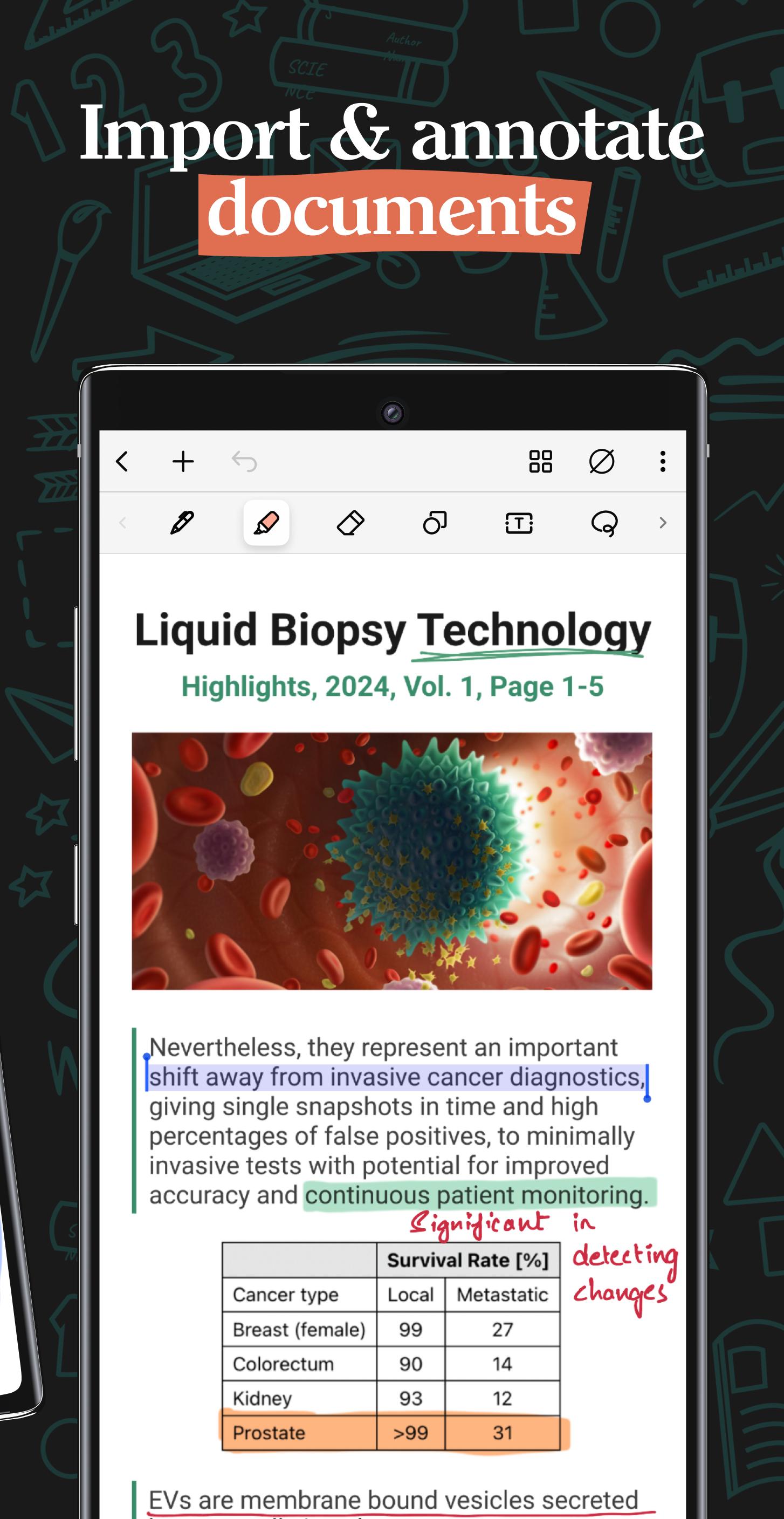
You can import PDFs and images, then mark them up with ink, text, and shapes. A built in scanner captures documents, and background removal with freeform cropping helps you insert only what matters. When you need visuals, Unsplash and Pixabay libraries are available, along with stickers and emojis. For access and safety, Google Drive sync keeps notes available on Android devices, while auto backup supports Google Drive, OneDrive, Dropbox, and WebDAV, and you can auto publish to Evernote or export as PDF or images. Password and biometric lock add an extra layer of protection.
Noteshelf 3 can be used for free with limits, which helps you test the basics before upgrading. A one time premium unlock on Android is offered for features such as unlimited notebooks, handwriting recognition and search, and digital diaries. Pricing is shown in the app and may vary by region. User reports indicate a typical price of 4.99 USD for the premium unlock.
Schools, universities, and businesses that plan to deploy Noteshelf 3 at scale can contact the developer for available offers. Centralized purchasing and support inquiries are handled directly by the team. This option helps institutions standardize note taking across classrooms and departments.
This quick guide shows a simple setup for writing, annotating, and organizing your notes. Follow the steps in order, then adjust tools as your workflow grows. If you need an offline installer, you can download Noteshelf 3 from this page.
Noteshelf 3 brings handwriting, typing, PDF markup, and AI assistance into one workspace for school, work, and planning. It keeps notebooks organized and accessible across devices with cloud sync and backup. To get started, download Noteshelf 3 latest version on this page.
For questions or institutional licensing, use the official contact options below.
Last updated on Feb 5, 2026
- Introducing saved clips! You can now save any content i.e. handwriting, text, images, stickers or a combination of all, as clips for later use. To create a clip out of your content, simply lasso it and select the 'Save Clip' option from the menu.
- You can now customize the mini toolbar with more colors — add as many as you like and switch between them with ease!
- Minor bug fixes and performance updates.
~ Noteshelf—Take beautiful notes, effortlessly ~
Latest Version
 3.2.2
3.2.2
Uploaded by
Roy Govind
Requires Android
Android 11.0+
Available on

Category
Report




Discover what you want easier, faster and safer.

Noteshelf 3
Digital Notes3.2.2 by Fluid Touch
Feb 5, 2026