


Use APKPure App
Get FM Tutorial old version APK for Android
Demonstrates how FM (frequency modulation) works in synthesizers and keyboards.
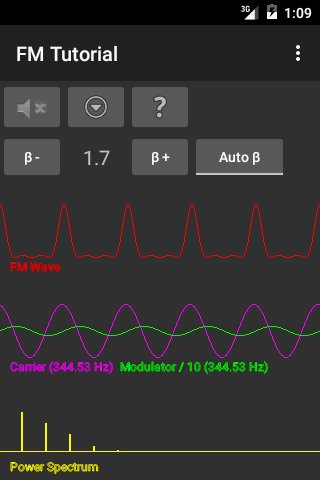
This app demonstrates how frequency modulation (FM) is used in FM synthesizers to generate sounds.
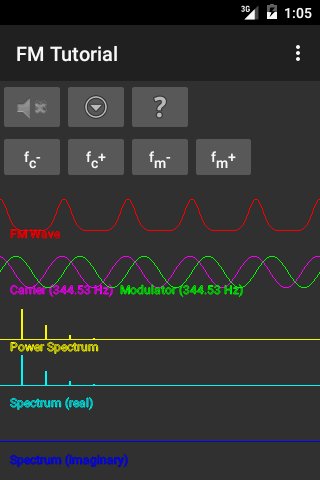
The app plays the FM sound, displays the carrier, modulator and resulting modulated wave as well as the power spectrum and the real and imaginary parts of the spectrum.
Sound and display are changed in real-time as the user modifies the following parameters.
Modulation Index (Beta):
"Depth" of modulation. The larger this value the more the carrier wave gets "warped"
and the more harmonics appear in the spectrum
Carrier Phase (Phi):
Shifting the phase of the carrier against the modulator changes the form of the
modulated wave and the spectrum.
Carrier and modulator frequencies: These can also be altered.
A Help button (?) for a brief description of the buttons and a more detailed Help in the Menu are available.
The More button (upside down triangle) lets you toggle through the various parameter settings.
Switch additional spectra (real and imaginary) on and off by up and down fling on the screen.
Zoom in/out by right/left fling across waves or spectrum (they zoom independently).
FM synthesis explained:
In a nutshell, FM synthesis works by changing the frequency of a sound wave (carrier) in accordance with the current value of a second wave, the modulating wave (modulator). If carrier and modulator have the same frequency then the increase and decrease of the carrier wave's frequency takes place within the space of one period of the wave. The result is that the shape of the wave is changed while the
period stays the same. If the un-modulated carrier is a sine wave then the modulated will be deformed into something different. This means the spectrum gets additional harmonics, i.e. the sound changes and becomes richer.
A similar effect occurs when carrier and modulator frequencies form small integer ratios.
FAQ:
Q: Why does the wave change faster/slower when LFO and/or Detune are ON and I toggle speaker ON/OFF (using the button in the app)?
A: When the speaker is OFF then the speed with which the display changes can vary between devices, depending on how fast the number crunching is performed.
Last updated on Apr 8, 2025
Minor bug fixes and improvements. Install or update to the newest version to check it out!
Latest Version
 1.5
1.5
Uploaded by
Duggu Patel
Requires Android
Android 5.0+
Available on

Category
Report

Discover what you want easier, faster and safer.

FM Tutorial
1.5 by Frequent Mind
Apr 8, 2025