How to Download KineMaster - Video Editor APK Latest Version for Android 2025
2025-11-06
Read through this guide to learn how to download and install KineMaster - Video Editor apk latest version 7.8.11.35478.GP on mobile in 2025. Follow the step-by-step tutorial to download KineMaster - Video Editor apk for Android.
What is KineMaster
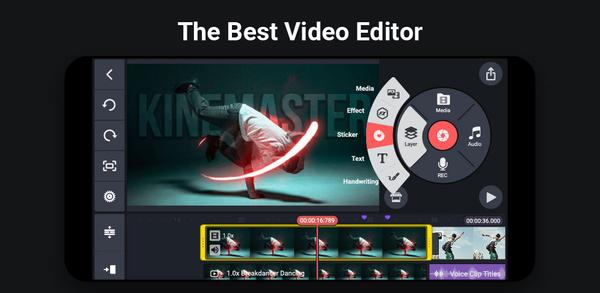
KineMaster is a feature-rich mobile video editing app designed for Android devices. It offers multiple video layers, precise cutting and trimming, transitions, text overlays, and a library of stock audio and effects. Built for both beginners and seasoned editors, it provides a user-friendly timeline interface, real-time preview, and export options that support high-definition video. The app accommodates advanced users with tools like chroma key, voiceovers, and blending modes, while still remaining accessible to casual creators. Overall, KineMaster enables high-quality edits directly on a phone or tablet, on the go.

A Pro Video Editing Tool for Mobile & Chromebook
Features
- Multi-layer timeline: add and stack video, audio, images, and effects across several tracks.
- Precision editing: frame-by-frame cutting, trimming, and accurate keyframe control.
- Visual and audio effects: transitions, color grading, chroma key, filters, and audio adjustments.
- Text and handwriting: customizable titles, captions, and handwritten notes.
- Export options: high-quality video exports with adjustable resolution and frame rate.
- Intuitive UI: clean, portable design tailored for touch screens.
How to download KineMaster on mobile
Method 1: Download from Google Play (Recommended)
Here is a step-by-step guide:
Step 1: Open the Google Play Store app on your Android phone or tablet.
Step 2: Tap the search bar at the top of the screen. Enter "KineMaster" in the search box and hit the search icon.
Step 3: Find the official app named "KineMaster - Video Editor" by the developer "KineMaster, Video Editor Experts Group" in the results.
Step 4: Tap the Install button on the app’s page. The app will start downloading, and the duration will depend on your internet connection speed.
💡 System Requirements
To ensure a smooth experience, your Android device should ideally be running Android 8.0 or above and have at least 3GB of RAM.
Method 2: download from APKPure
Step1: Visit APKPure in a browser.
Step 2: Search for “KineMaster” and choose the official APK.
Step 3: Enable unknown sources in Android settings if prompted, then download and install the APK.
Step 4: Launch KineMaster from your app drawer after installation.
Download from App Store (Recommended)
Step 1: Open the App Store.
Step 2: Search for “KineMaster.”
Step 3: Tap Get/Install to download and install.
Step 4: Open the app and follow on-screen setup.
Why download from APKPure
- Access to a broader set of APK options when the official store is restricted or slow.
- Useful for users who need direct APK distribution for quick testing or backup installations.
- Convenience when regional availability is limited (note: always verify APK authenticity and safety).
Security tips
- Prefer official stores (Google Play or App Store) as the primary source.
- If using APKs from third-party sites, ensure the source is reputable and verify the APK hash if possible.
- Keep the device’s security settings up to date and enable Play Protect/Device Protection features.
- Avoid downloading from untrusted links or sites that prompt unusual permissions.
- Regularly update KineMaster to receive security patches and new features.
A Pro Video Editing Tool for Mobile & Chromebook
 NEWS
NEWS REVIEWS
 HOWTO
HOWTO TOPICS
 PUBG M
 Roblox Codes